Email Address:
admin@achik.us achikahmed.info@gmail.com
Our Social Media Profiles:

Python is one of the most popular programming languages in the world. It is used for web development, automation, cybersecurity, artificial intelligence, data analysis, and many other types of software projects. If you want to learn programming but only have an Android phone, you can still start your Python journey using the Pydroid 3 application. It provides a complete Python environment on Android, allowing you to write, run, and save Python programs directly from your mobile device without needing a computer.
Here’s what you will learn in this guide:
Python is a beginner-friendly programming language that is known for its simple and easy-to-read syntax. It is one of the best programming languages for beginners because it uses straightforward commands that are easy to understand. Python is used by students, developers, cybersecurity professionals, and companies around the world to build different types of applications and automate tasks.
Pydroid 3 is a Python IDE application for Android devices. An IDE, r Integrated Development Environment, is a software application that provides everything needed to write and run code. Pydroid 3 includes a code editor, Python interpreter, and package manager, making it possible to learn and practice Python on Android without requiring a computer.
Open the Google Play Store on your Android device and search for the Pydroid 3 application. Download and install the application, then launch it after the installation is complete. Once opened, you will see a code editor where you can write, edit, save, and run Python programs.
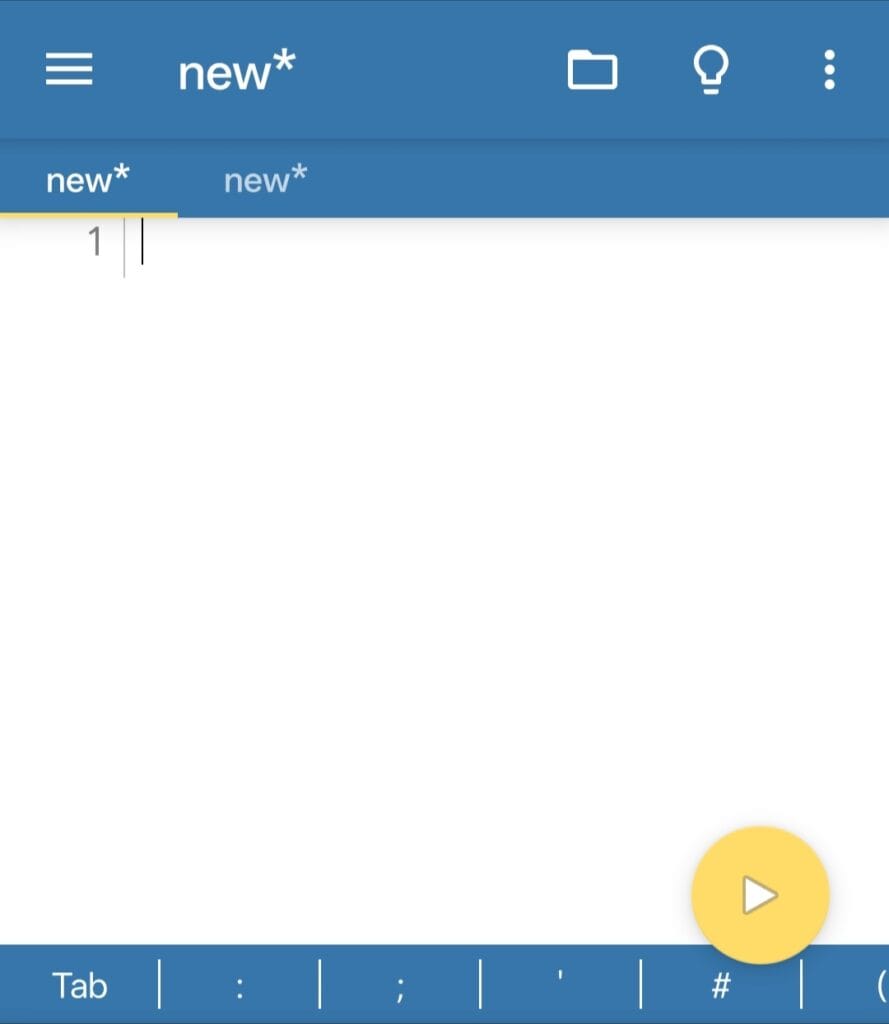
The code editor is the main area where you will write your Python code. At the top of the application, you will also find a Run button that is used to execute your programs and display the output.
Now it’s time to create your first Python program. Inside the Pydroid 3 editor, enter the following code exactly as shown below.
print("Hello World")After entering the code, tap the Run button located at the top-right corner of the application. Pydroid 3 will execute the program and display the output.
Output:
Hello World
Congratulations! You have successfully created and executed your first Python program on Android.
The program you just created uses the print() function. In Python, the print function is used to display text or information on the screen. The text inside quotation marks is called a string. When Python runs the program, it displays the text exactly as written inside the print function.
For example:
print("Welcome to Python")Output:
Welcome to Python
This is one of the most commonly used functions in Python and is often the first thing beginners learn.
Python allows you to display multiple messages by using more than one print statement. Each print statement displays its output on a new line.
print("Welcome to Python")
print("Learning Programming")
print("Using Android")Output:
Welcome to Python
Learning Programming
Using Android
This can be useful when creating programs that need to display instructions, menus, or multiple pieces of information.
Variables are used to store information in a program. Think of a variable as a container that holds data which can be used later in your code.
name = "example_variable"
print(name)Output:
example_variable
In this example, the variable name stores the value "example_variable". When the print function is used, Python displays the value stored inside the variable.
Variables can store text, numbers, and many other types of data.
Programs often need information from users. Python provides the input() function for this purpose. It allows the user to enter information while the program is running.
name = input("Enter your name: ")
print("Hello", name)When the program runs, it will ask for a name.
Example:
Enter your name: John
Hello John
This makes your programs interactive because they can respond to user input.
Python can also perform mathematical calculations. This makes it useful for creating calculators, automation scripts, and many other applications.
print(10 + 5)Output:
15
Addition:
print(10 + 5)Subtraction:
print(10 - 5)Multiplication:
print(10 * 5)Division:
print(10 / 5)Python automatically calculates the result and displays it on the screen.
Now that you know how to display text, use variables, accept user input, and perform calculations, you can create a simple calculator program. This calculator asks the user to enter two numbers and choose an operation such as addition, subtraction, multiplication, or division. Based on the selected option, Python performs the calculation and displays the result.
print("Simple Calculator")

num1 = float(input("Enter first number: "))
num2 = float(input("Enter second number: "))

print("1. Addition")
print("2. Subtraction")
print("3. Multiplication")
print("4. Division")

choice = input("Choose an operation (1/2/3/4): ")

if choice == "1":
    print("Result:", num1 + num2)

elif choice == "2":
    print("Result:", num1 - num2)

elif choice == "3":
    print("Result:", num1 * num2)

elif choice == "4":
    if num2 != 0:
        print("Result:", num1 / num2)
    else:
        print("Cannot divide by zero")

else:
print("Invalid choice")Example:
Simple Calculator
Enter first number: 20
Enter second number: 10

1. Addition
2. Subtraction
3. Multiplication
4. Division

Choose an operation (1/2/3/4): 1
Result: 30.0
This project combines several Python concepts into a single program and is a great way to practice what you have learned so far.
If you enjoyed building your first Python program and want to learn Python in more detail, you can check out this beginner-friendly Python course on Udemy:
https://www.udemy.com/100-day-python-course
The course covers Python fundamentals, variables, loops, functions, projects, and other important concepts that can help you continue your programming journey.

After writing your program, you can save it for future use. Tap the menu button inside Pydroid 3 and select Save. Enter a filename such as:
hello.py
The .py extension indicates that the file is a Python program. Once saved, you can open, edit, and run the file whenever you want.
When learning Python, it is normal to make mistakes. One common mistake is forgetting quotation marks around text.
Wrong:
print(Hello)
Correct:
print("Hello")Another common mistake is forgetting a closing bracket.
Wrong:
print("Hello"Correct:
print("Hello")Whenever Python finds an error, it displays a message explaining what went wrong. Reading these messages carefully can help you learn and fix mistakes quickly.
After creating your first Python program, you can continue learning more Python topics such as:
Learning these topics will help you build more advanced Python projects in the future.
Python is one of the best programming languages for beginners, and Pydroid 3 makes it possible to learn and practice Python on an Android device. By creating simple programs and experimenting with different Python concepts, you can gradually improve your programming skills and start building more useful projects in the future.